Everyone is talking about loop engineering. Almost nobody is showing you how to run it on a model you own.
In June 2026, two sentences from Peter Steinberger (creator of OpenClaw, now at OpenAI) hit several million views: stop prompting your coding agents, start designing loops that prompt them for you. Boris Cherny, who runs Claude Code at Anthropic, had said the same thing on stage days earlier: he doesn’t prompt anymore, his job is to write loops. The idea is real and the tooling has caught up. But almost every guide assumes you are pointing your loop at a frontier API and have a budget that absorbs millions of tokens overnight.
This guide takes the opposite position. The single biggest weakness of an autonomous loop is cost, and the second is that you are shipping your entire codebase to a third party on every iteration. A local model solves both. When the agent is running on your own GPU, the only thing a runaway loop costs you is electricity, and nothing leaves your network. That changes the risk calculation completely. You can let it run.
Here is how to build one, step by step, on hardware you already have.
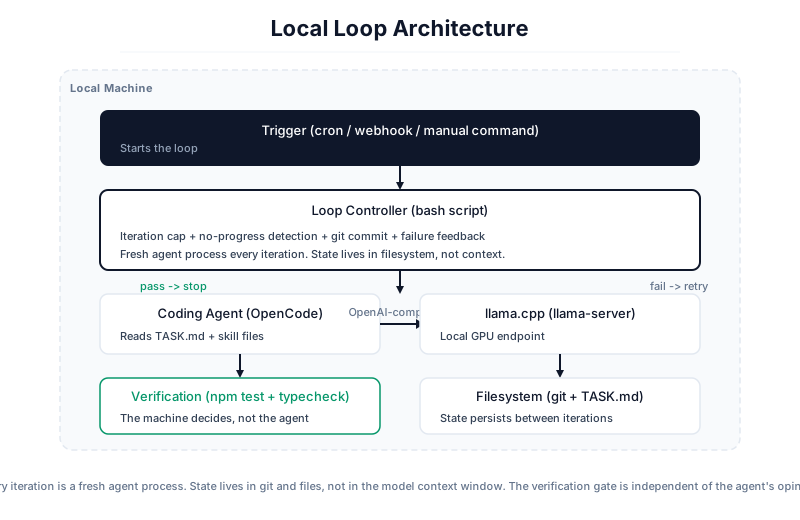
Every iteration is a fresh agent process. State lives in git and files, not in the model context window. The verification gate is independent of the agent's opinion.What a loop actually is
Strip away the hype and a loop is a small control system with exactly two required parts:
- A trigger. Something that starts the loop. A cron schedule, a failing CI run, a webhook, or you typing one command.
- A verifiable goal. A defined end state the loop checks against after every pass. Tests pass and the build is green is a good goal. “Make it better” is not a goal, it is a token furnace with no off switch.
The thing that makes it a loop and not a cron job is the decision-maker inside it. A cron job runs a fixed script. A loop runs an agent that looks at the current state, picks the next action, does it, checks the result, and decides whether to continue, retry, roll back, or stop. The script is the outer layer. The model is the worker inside it. That control hierarchy is the whole game, and getting it backwards is the most common mistake.
This is not new computer science. It is a while loop, tool-call handling, accumulated state, and an exit condition. The only thing that changed is that the decision-maker shifted from hardcoded rules to a model good enough to judge “done” for itself.
Why local for the loop specifically
A one-shot prompt to a frontier model is cheap and you should keep doing it. Loops are different because they multiply everything. If you let an agent prompt itself, review itself, retry, and spawn helpers, you can burn millions of tokens in a single overnight run. That is the recurring warning in every serious writeup of the pattern, and it is correct.
Run the loop on a local model and that constraint mostly disappears:
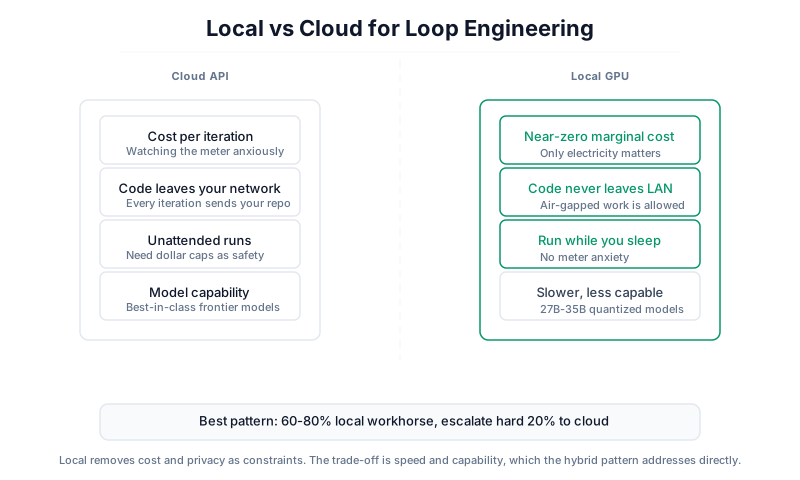
- Cost stops being part of the architecture. You no longer need a per-day dollar cap as your primary safety brake, because the marginal cost of one more iteration is near zero. You still want an iteration cap, but for correctness reasons, not billing ones.
- Nothing leaves your machine. Every iteration of a loop re-reads your repo. On a hosted API that is your proprietary code crossing the wire dozens of times unattended. On a local endpoint it never leaves the LAN. For regulated, proprietary, or air-gapped work this is the difference between “allowed” and “not allowed.”
- You can let it run while you sleep without watching the meter. The whole appeal of loops is unattended work. Local removes the anxiety that makes people babysit the run anyway.
The honest trade-off: a local model on a single consumer GPU is slower and somewhat less capable than a frontier API. The 2026 consensus pattern handles this directly. Run sixty to eighty percent of your loop traffic locally, and escalate only the hard twenty percent to a frontier API when you genuinely need it. The loop you build below is the local workhorse. Wiring in a cloud reviewer for the hard cases is a one-line config change once the loop works.
Local removes cost and privacy as constraints. The trade-off is speed and capability, which the hybrid pattern addresses directly.What you need
This guide assumes a setup roughly like a single 24GB GPU (an RTX 3090 or 4090), which is the sweet spot for local agentic coding in 2026. Everything scales down to less and up to more.
- A GPU with 24GB VRAM. This comfortably runs a quantized 27B to 35B model with real context room left over. Less VRAM means a smaller model; more means you can run the bigger MoE variants.
- An inference server that exposes an OpenAI-compatible endpoint.
llama.cpp’s llama-server is the reference choice and what this guide uses. Ollama and LM Studio work the same way if you prefer them. - A coding agent that drives tools. OpenCode is the cleanest open option and points at any OpenAI-compatible endpoint. Codex and Claude Code also work; the loop shape is deliberately tool-agnostic.
- A repo with a test command. The loop is only as trustworthy as the check it runs. No tests, no verifiable goal, no loop.
A note on model choice, because it changes monthly and you should not trust a frozen list. As of mid-2026 the Qwen 3.5 family is the workhorse name for local agentic coding: the 27B for single-GPU work where you want context headroom, and the 35B A3B MoE when you want expert routing without needing absurd amounts of VRAM. The coder-tuned variants are purpose-built for tool calling, which is exactly what a loop needs. Whatever you pick, the only benchmark that matters is your own eval on your own repo. Bookmark r/LocalLLaMA and re-check every few weeks, because the model that wins your loop in six months probably has not been released yet.
Step 1: Serve the model
Start the inference server and confirm it is listening before you touch anything else. With llama.cpp:
1
2
3
4
5
6
7
8
| llama-server \
--hf-repo unsloth/Qwen3.5-27B-GGUF \
--hf-file Qwen3.5-27B-Q4_K_M.gguf \
--host 0.0.0.0 \
--port 8080 \
--ctx-size 32768 \
--n-gpu-layers 99 \
--jinja
|
Three flags matter more than the rest:
--n-gpu-layers 99 pushes all model layers onto the GPU. This is the single most common performance bug in local agent setups. If you leave layers on the CPU by accident, your tokens-per-second collapses and people wrongly blame the model. If the whole model does not fit, lower this number until it does, but get as much onto the GPU as you can.--ctx-size is your context budget. Agentic loops eat context fast because they accumulate tool output. 32k is a reasonable floor on 24GB; push it as high as your VRAM allows after the weights are loaded.--jinja enables proper chat-template handling. This is the flag that makes tool-calling work correctly. A broken chat template is the number one reason local models fail at agentic tasks while looking fine in plain chat. Do not skip it.
Confirm it is alive:
1
| curl http://127.0.0.1:8080/v1/models
|
If that returns JSON, your endpoint is up. Note the /v1 suffix. Agents expect the OpenAI-compatible path and silently fail without it.
If the GPU lives on a different box from your laptop, do not expose port 8080 to your network directly. Put both machines on a private mesh (Tailscale is the common choice) and point the agent at the private address. Treat the model server like any other internal service.
Step 2: Point the agent at it
Tell OpenCode about your local endpoint. Create or edit ~/.config/opencode/opencode.json:
1
2
3
4
5
6
7
8
9
10
11
12
13
14
15
16
17
18
19
| {
"$schema": "https://opencode.ai/config.json",
"provider": {
"llama-local": {
"npm": "@ai-sdk/openai-compatible",
"name": "llama-server (local)",
"options": {
"baseURL": "http://127.0.0.1:8080/v1"
},
"models": {
"qwen3.5-27b": {
"name": "Qwen3.5-27B (local)",
"tools": true,
"limit": { "context": 32768, "output": 8192 }
}
}
}
}
}
|
The "tools": true line is not optional for loop work. It tells the agent the model can call tools, which is the entire mechanism by which the model edits files, runs tests, and reads results. Set the context limit to match the --ctx-size you served with. Launch OpenCode, run one ordinary task by hand, and confirm the model actually edits a file and runs a command. Do not build a loop on top of an agent you have not seen work once manually.
Step 3: Give the agent a skill file
Before you automate anything, write down what the agent should never have to rediscover. This is the single highest-impact step and the one most people skip.
A loop with no reusable knowledge re-learns your project from zero on every iteration. It re-reads your conventions, re-guesses your test command, re-discovers your folder layout, and burns tokens doing it. A loop with a good skill file compounds instead. You write the convention once and every future iteration starts from it.
Put project rules in a file the agent reads automatically (AGENTS.md for OpenCode, CLAUDE.md for Claude Code). Keep it dense and specific:
1
2
3
4
5
6
7
8
9
10
11
12
13
14
15
16
17
18
19
| # Project conventions
## Test command
Run the full suite with: `npm test`
A change is only done when this exits 0.
## Type checking
Run: `npm run typecheck`
Both tests and typecheck must pass before any change is considered complete.
## Conventions
- TypeScript strict mode. No `any`.
- No new dependencies without an explicit note in the PR description.
- Match the existing file structure; do not reorganize folders.
## Definition of done
- All tests pass.
- Typecheck passes.
- The git diff is minimal and touches only files relevant to the task.
|
The rule of thumb: one skill per task, each file as dense as you can make it, and do not let them bloat the context. If you accumulate many, ask the agent to build an index so it opens only the relevant one per run instead of loading all of them. This is the difference between a loop that gets cheaper over time and one that pays full price every iteration.
Step 4: Wrap it in a loop
Now the actual loop. We use the Ralph pattern, named after Ralph Wiggum because it is not clever, it just never gives up. The insight that makes it work: each iteration is a fresh agent process. Memory does not live in the model’s context window, where it rots and overflows. It lives in the filesystem, in git commits and a progress file. Each pass reads the current state, does one thing, verifies, and writes state for the next pass. Stateless worker, durable state. Unix figured this out decades ago; LLM tooling is catching up.
Here is a hardened loop. Read it once, then read the safety notes under it, because the brakes are the point.
1
2
3
4
5
6
7
8
9
10
11
12
13
14
15
16
17
18
19
20
21
22
23
24
25
26
27
28
29
30
31
32
33
34
35
36
37
38
39
40
41
42
43
44
45
46
47
48
49
50
| #!/usr/bin/env bash
set -uo pipefail
MAX_ITERATIONS=15
ITERATION=0
NO_PROGRESS_COUNT=0
LAST_DIFF_HASH=""
while [ "$ITERATION" -lt "$MAX_ITERATIONS" ]; do
ITERATION=$((ITERATION + 1))
echo "=== Iteration $ITERATION / $MAX_ITERATIONS ==="
# 1. Run the agent once against the task. Fresh process every time.
opencode run -m llama-local/qwen3.5-27b "$(cat TASK.md)"
# 2. Verify against the real goal. The agent's opinion does not count.
if npm test > /tmp/test.log 2>&1 && npm run typecheck > /tmp/tc.log 2>&1; then
echo "Goal met: tests and typecheck pass. Stopping."
git add -A && git commit -m "loop: task complete in $ITERATION iterations"
exit 0
fi
# 3. No-progress detection. If the diff has not changed in two passes, stop.
CURRENT_DIFF_HASH=$(git diff | sha256sum | cut -d' ' -f1)
if [ "$CURRENT_DIFF_HASH" = "$LAST_DIFF_HASH" ]; then
NO_PROGRESS_COUNT=$((NO_PROGRESS_COUNT + 1))
if [ "$NO_PROGRESS_COUNT" -ge 2 ]; then
echo "No progress in two iterations. Stopping for human review."
exit 2
fi
else
NO_PROGRESS_COUNT=0
fi
LAST_DIFF_HASH="$CURRENT_DIFF_HASH"
# 4. Commit the work-in-progress so every iteration is auditable.
git add -A && git commit -m "loop: iteration $ITERATION (WIP)" --allow-empty
# 5. Feed the failure back for the next pass.
{
echo ""
echo "## Last iteration failed. Test/typecheck output:"
echo '```'
tail -n 40 /tmp/test.log /tmp/tc.log
echo '```'
} >> TASK.md
done
echo "Hit iteration cap without meeting goal. Stopping for human review."
exit 1
|
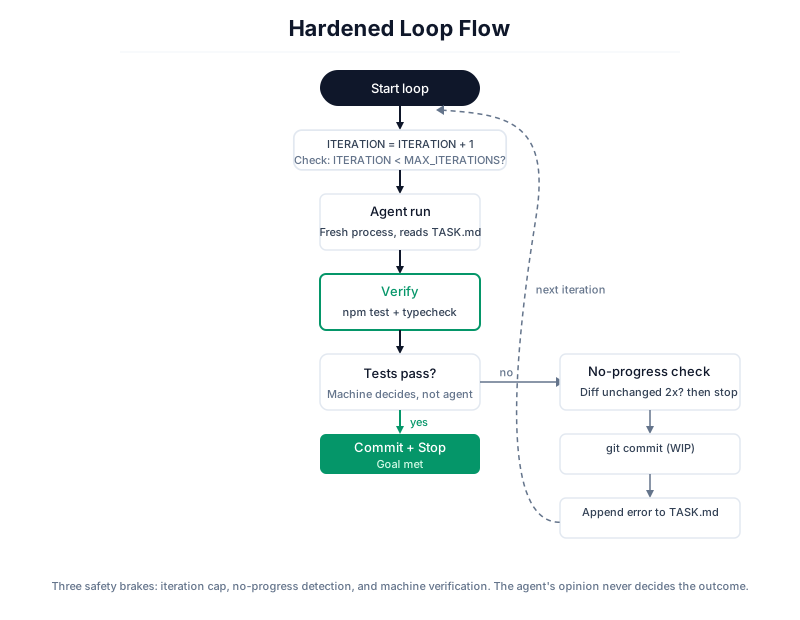
The brakes are not decoration. They are what separate a loop from a runaway:
- Iteration cap (
MAX_ITERATIONS). This is your primary safety net, not a nice-to-have. Even on a local model where cost is near zero, a loop with no cap that cannot solve the task will thrash forever. Five to fifteen is a sane ceiling. The “completion promise” string that some plugins use is a success signal, not a safety mechanism. The cap is the safety mechanism. - No-progress detection. If two consecutive iterations produce the identical diff, the agent is stuck in a rut and more iterations will not help. Stop and hand it to a human. This single check saves more wasted runs than any other.
- Verification stronger than the agent’s word. The loop stops on
npm test passing, not on the model announcing it is done. In production, a claim is not done until something independent checks it. This is non-negotiable, and it is exactly why the loop is only as good as your test suite. - A clean git commit every iteration. Every pass leaves an auditable diff. If the loop goes wrong, you can see exactly which iteration broke things and roll back to the commit before it. This is also what makes the stateless-worker model work: state lives in git, not in the model.
Three safety brakes: iteration cap, no-progress detection, and machine verification. The agent's opinion never decides the outcome.Step 5: Add a trigger
You now have a loop you start by hand. Turn it into something that wakes itself up. The simplest trigger is cron. A loop that runs every morning, reads yesterday’s CI failures, picks one, and tries to fix it:
1
2
3
| # crontab -e
# Run the fix loop every weekday at 6am
0 6 * * 1-5 cd /home/you/project && ./fix-loop.sh >> /var/log/fix-loop.log 2>&1
|
For something more responsive, trigger on an event instead of a clock: a GitHub webhook on a failing CI run, a label added to an issue, or a message in a channel. The trigger does not change the loop. It just decides when the loop starts. Start with cron and a manual kill switch. Add event triggers only once you trust the loop unattended.
A complete example: the overnight test-coverage loop
Here is a full, realistic loop that is well-suited to a local model, because the task is bounded and every step is verifiable. The goal: raise test coverage on a module without changing behavior.
TASK.md:
1
2
3
4
5
6
7
8
9
10
11
12
13
14
15
| # Task: raise test coverage on src/payments/
## Goal
Increase line coverage of src/payments/ to at least 90%.
Do not modify any file in src/payments/ itself.
Only add tests under tests/payments/.
## How to check coverage
Run: `npm run coverage -- src/payments/`
The summary prints a line-coverage percentage for the directory.
## Done when
- Coverage of src/payments/ is >= 90%.
- The full test suite (`npm test`) still passes.
- No file under src/payments/ has been modified (`git diff --stat src/payments/` is empty).
|
This task is a good fit because the goal is genuinely verifiable (a coverage number crosses a threshold), the blast radius is contained (the agent may only write test files), and a regression is impossible to hide (the existing suite must still pass and the source must be untouched). Point the loop from Step 4 at this TASK.md, swap the verification check for the coverage threshold, and let it run overnight. On a local model this costs you nothing but the GPU’s power draw, and your payments code never left the building.
Tasks that are a bad fit for a loop, local or not: anything where “done” is subjective. Redesigning an API, exploring a product direction, “make the UX feel better.” Hand those to a loop and it will optimize toward whatever vague sentence you wrote, which is usually worse than one careful manual pass. If you cannot write the done condition as a command that exits 0, do not build a loop yet. Go figure out the done condition first.
Where this breaks, honestly
Two failure modes get sharper as the loop gets better, and a local model does not fix either.
Defining the goal is the hard part. This is now where your effort goes. A loop optimizes relentlessly toward whatever you told it “done” means, so a fuzzy goal produces confident, fast, wrong work. Spend your thinking on the success condition, not the prompt. The prompt is rarely the bottleneck anymore.
Verification has blind spots. “Passes tests and typechecks” does not catch security regressions, license contamination, subtle semantic bugs, or broken cross-module invariants. The Ralph pattern works best exactly where tests are cheap and correctness is explicit. In security-sensitive or correctness-critical code, the gap between “the loop says it passed” and “it is actually correct” is where the real risk lives. This is the right place to spend your hard twenty percent: route the review step to a frontier model, or just read the diff yourself. A local worker loop with a cloud reviewer on the verification step is a strong, cheap hybrid.
The takeaway
Prompt engineering is not dead. The power shifted. Five years ago you wrote the code. Two years ago you prompted a model to write it. Last year you watched an agent write it and approved changes one at a time. Today, for bounded and verifiable tasks, you design the loop that prompts, checks, retries, and stops, and you run it on a model you own so cost and privacy stop being the reasons you cannot let it run unattended.
Whatever you automate, stay the engineer. Write the skill files. Define the stop conditions and the precise goal. Read what it shipped. A loop is a tool for moving faster on work you understand, or a tool for avoiding understanding the work at all. On your own hardware the temptation to let it run forever is stronger, because it is free. Resist it. The iteration cap, the test gate, and your own eyes on the diff are what keep the loop working for you instead of the other way around.