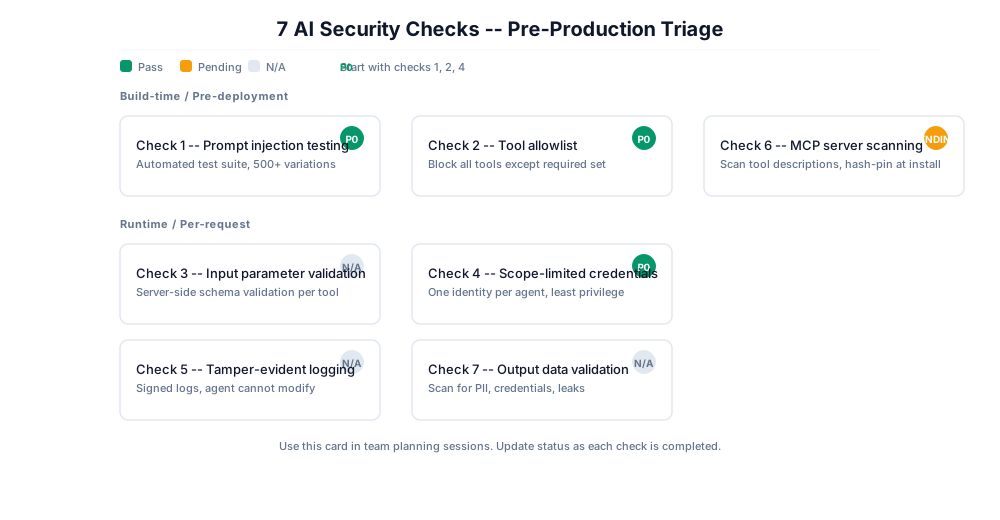
Most AI security checklists have 40+ items. Three days from launch with one afternoon available and that list is not the tool you need.
These 7 checks target the controls whose absence shows up most often in production incident post-mortems. They will not make your system bulletproof. They will catch the majority of issues that actually cause incidents — and if your system passes all 7, you have a defensible baseline to build from.
Two numbers frame why this matters in mid-2026:
- 83% of organizations plan to deploy agentic AI. Only 29% feel ready to operate it securely. That readiness gap — from Cisco’s State of AI Security 2026 — is the clearest quantification yet of why AI security debt is piling up faster than teams can pay it down.
- Over 25% of 30,000+ analyzed agent skills contained at least one vulnerability (same report). The attack surface isn’t theoretical anymore; it’s shipping.
How to use this list
Read it top to bottom once. If only time for three, do Check 1 (prompt injection testing), Check 2 (tool allowlist), and Check 4 (scope-limited credentials). Those three block the most common attack paths on their own.
Each check follows the same four-part shape: what it is, what failure looks like, how to run it, and what most teams do instead. The last one is where the incidents come from.
What it is: Run an automated prompt injection test suite against your system before launch.
What failure looks like: The model follows instructions injected through user input, tool outputs, or retrieved documents — overriding its system prompt or triggering unauthorized tool calls. This is still the #1 entry in the OWASP LLM Top 10.
How to run it: Stand up PyRIT (open source, MIT-licensed) and run it against your endpoint using the built-in HarmBench and AdvBench datasets as a baseline. You want statistical results — attack success rate (ASR) across at least 500 variations — not a pass/fail from 10 manual prompts.
Here’s why the number matters: independent research puts injection success rates above 80%, and as high as 95%, against undefended production agents. Against that baseline, a 3% ASR doesn’t mean “almost safe” — at scale it means thousands of successful attacks. Measure it, track it across model versions, and treat it as a regression metric, not a one-time gate.
What most teams do instead: Run 10–15 manual prompts, see no bypass, mark it complete. Manual testing against a probabilistic system has no predictive validity. A model update the day before launch silently invalidates every manual result.
What it is: Your agent should only be permitted to call the specific tools required for its defined function. Everything else is blocked by default.
What failure looks like: An agent can call any registered tool, with controls only applied after the fact via monitoring. Attackers do not need to exploit code. They manipulate the model into calling a tool that was always available and never should have been accessible.
How to run it: List every tool your agent has access to. For each tool, ask whether this agent needs this capability to perform its defined job. If the answer is no, remove the tool from the registry. What remains is your allowlist. Document it and enforce it at the framework layer.
What most teams do instead: Register every available tool “for convenience” and plan to monitor for misuse. Monitoring is not a substitute for a restricted surface. An agent that cannot call a tool cannot misuse it.
Checks 2, 3, and 4 compose. Check 2 restricts which tools can be called. Check 3 restricts what gets passed into them. Check 4 limits how much damage a successful call can do. None is sufficient alone; together they bound the blast radius from three independent directions.
What it is: Check 2 restricts which tools can be called. Check 3 restricts what gets passed into them once called. Both controls are necessary. Neither is sufficient alone.
Before any tool call is executed, validate the model-generated parameters against a defined schema.
What failure looks like: The model produces a tool call with attacker-influenced parameters — a file path that traverses outside the allowed directory, a database query with injected content, an API call to an unauthorized endpoint. The model didn’t generate harmful output. The harm is in the parameters it handed to a legitimate tool.
How to run it: For each tool in your allowlist, define an explicit parameter schema: allowed types, value ranges, path patterns. Implement server-side validation that rejects any call that doesn’t conform. Log every rejection with the full parameter payload — those logs are your incident-investigation record.
What most teams do instead: Trust that the model will generate reasonable parameters because the system prompt describes the intended use. System prompts are advisory to the model. They are not enforced constraints.
Check 4 — Issue scope-limited credentials per agent
What it is: Each agent gets its own identity with credentials scoped to the minimum permissions required for its defined function. No shared credentials. No broad-access keys.
What failure looks like: Every agent shares one API key or service account with administrative access. A single manipulated agent then hands an attacker full access to every backend that key touches — across every agent instance in production.
How to run it: Create a dedicated service identity per agent. Scope its permissions to the specific resources in that agent’s workflow. Test by attempting operations outside the defined scope — those calls should fail. Record the scope as part of your deployment artifact.
What most teams do instead: Use a shared admin key because it’s faster to set up. Credential scope is the most reliable blast-radius control. When other controls fail — and some will — credential scope decides how much it costs you.
Check 5 — Log every agent action with tamper-evident integrity
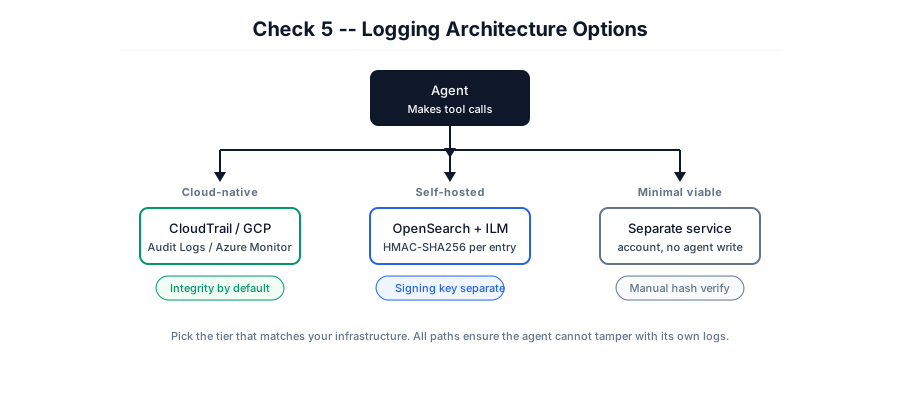
What it is: Every action your agent takes, every tool call, every parameter, every response, is logged with a tamper-evident signature in a system the agent itself cannot modify.
What failure looks like: Agents produce logs, but the logs are stored in a location the agent has write access to, or are stored without integrity protection. Post-incident investigation cannot establish what the agent actually did because the log chain cannot be trusted.
How to run it — three tiers, pick by infrastructure:
| Tier | Setup | Integrity mechanism |
|---|
| Cloud-native (easiest) | Route agent logs to CloudTrail / GCP Cloud Audit Logs / Azure Monitor | Integrity protection by default |
| Self-hosted (medium) | Append-only store (e.g. OpenSearch with ILM) + HMAC-SHA256 per entry | Signing key the agent cannot access |
| Minimal viable | Separate service account with no agent write permission | Manual hash verification before any investigation |
The cost channel. Researchers have documented “overthinking loop” attacks that trap an agent in cyclic reasoning, amplifying token consumption up to 142x with no data ever leaving the system. It doesn’t look like a breach. It quietly runs the API budget to the ceiling. Per-action logging plus token-cost alerting catches a denial-of-wallet attack before the invoice does. Cost controls and timeouts are now a security control, not just an ops concern.
What most teams do instead: Use standard application logging, assuming only legitimate processes write to the store. AI agents break that assumption.
Check 6 — Scan MCP servers before installation
What it is: Before installing any MCP server, scan it, including its tool descriptions, for adversarial content.
What failure looks like: A developer installs an MCP server from a community registry. It passes malware scanning. But its tool descriptions contain embedded instructions the agent will execute the moment tools/list loads them into context. The payload isn’t code — it’s a text string that traditional security tooling has no reason to flag.
This is not hypothetical. Adversa AI’s March 2026 digest counted 30 MCP CVEs filed in 60 days, with 38% of 500+ scanned servers running with no authentication at all. Researchers published working PoC for external prompt injection, tool prompt injection, and cross-tool hijacking. MCP is the fastest-growing attack surface in agentic AI right now.
How to run it:
- Scan with a purpose-built tool. Tooling exists and you should use it —
uvx snyk-agent-scan@latest flags poisoned tool descriptions (it catches the classic IGNORE PREVIOUS INSTRUCTIONS-style payload in a description field), and the OWASP MCP Top 10 scanner MCPSec maps findings to the MCP Top 10 categories. Treat any authentication finding as P0 — unauthenticated MCP servers are the open door most of these CVEs walk through. - Hash-pin the descriptions. Compute a hash of every tool’s description at install time and store it. Pin it in CI with something like
mcp-scan --hash-pin and fail the build on any diff. Recompute and compare on every reconnection. - Read the descriptions, not just the names. Review them manually for instruction-like language that isn’t operational documentation. This is the step most teams skip — and tool descriptions can change server-side after you install the package, which is exactly how a “rug pull” works: fifteen clean versions, then one poisoned update.
What most teams do instead: Scan for malware and assume tool descriptions are safe because they aren’t executable. They don’t need to be executable — they’re injected straight into the model’s context. Full attack chain and reproducible labs: aminrj.com/posts/mcp-tool-poisoning.
Check 7 — Validate outputs for sensitive data patterns
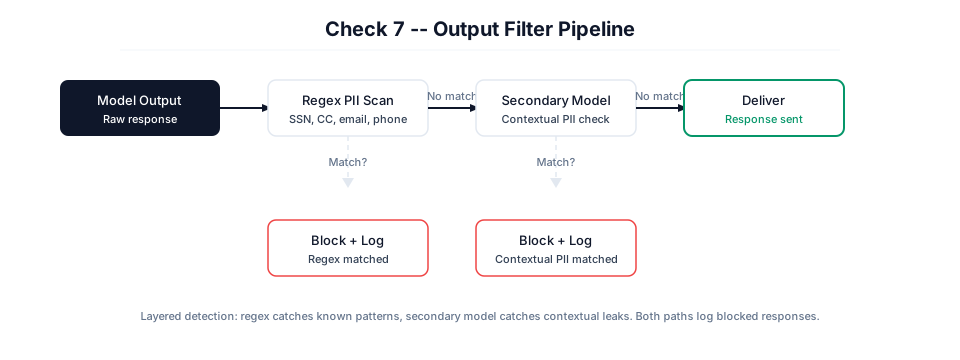
What it is: Before any agent response reaches the user or an external system, scan it for sensitive data patterns: PII, credentials, internal system references, data that should not leave your environment.
What failure looks like: The model includes a user’s full account details, another user’s information, or internal system credentials in a response. The model did not decide to leak this data. It was responding naturally to its context. No input validation was violated. No prompt injection was detected. The output was simply never checked.
How to run it: At minimum, scan every response server-side with a regex for common PII patterns (SSN, credit card, email, phone) and block on match. Layer a secondary model call for contextual PII if you handle health or financial data. For regulated environments, integrate your existing DLP provider rather than building a custom filter. Run it server-side — never in the client.
What most teams do instead: Pour security investment into input controls and assume a clean input yields a safe output. Output validation catches what input validation missed — an entire class of data leakage that has no input-side trigger.
What these 7 checks don’t cover
This is a triage list, not a complete security posture. It deliberately skips:
- Memory poisoning (OWASP ASI06). This is the most important gap to name explicitly, because every check above is single-turn. Memory attacks use temporal decoupling — the injection looks benign when planted (a doc summary, a “learned preference”), and the malicious behavior emerges weeks later from a different session. Cisco demonstrated this against Claude Code in April 2026 (persisting across projects and reboots; fixed in v2.1.50), and research like MINJA reports >95% injection success. Traditional input/output classifiers never see a single moment containing the full attack. If your agent has persistent memory, this belongs at the top of your next list.
- Training data security, model provenance, and fine-tuning corpus review.
- RAG knowledge-base access controls.
- Infrastructure hardening and agent-to-agent (A2A) message authentication.
- NIST AI RMF governance mapping and regulatory compliance documentation (e.g. EU AI Act).
These matter. They come after you have the 7 in place.
The bottom line
If you pass all 7 checks, you’ve addressed the controls that show up most often when AI deployments fail in production. You have a defensible baseline.
You do not yet have a complete AI security program — but you have something better than a 40-item list you’ll never finish: three afternoons of work that block the attack paths most likely to put your name in a post-mortem.
Start here: Check 1, Check 2, Check 4. Then come back for the rest.
Amine Raji, PhD, CISSP. AI/LLM security. Get in touch for pre-production security reviews.