When managing applications in Kubernetes, one of the most important challenges is handling secrets securely, cleanly, and in a GitOps-compatible way.
This post walks through how I use External Secrets Operator (ESO) with Azure Key Vault to manage Kubernetes secrets at scale, in a production-ready setup.
We use Terraform to bootstrap infrastructure and ArgoCD to manage Kubernetes manifests.
If you want secrets to stay out of Git, follow along.
Why use External Secrets Operator?
A few clear goals shaped this setup:
- No secrets in Git
- Centralized secret management using Azure Key Vault (or other provider)
- GitOps-compliant secrets synchronization via ArgoCD
- Multi-environment scalability with minimal duplication
External Secrets Operator (ESO) solves the missing piece by syncing secrets stored outside Kubernetes (e.g. Azure Key Vault) into your cluster, securely and automatically.
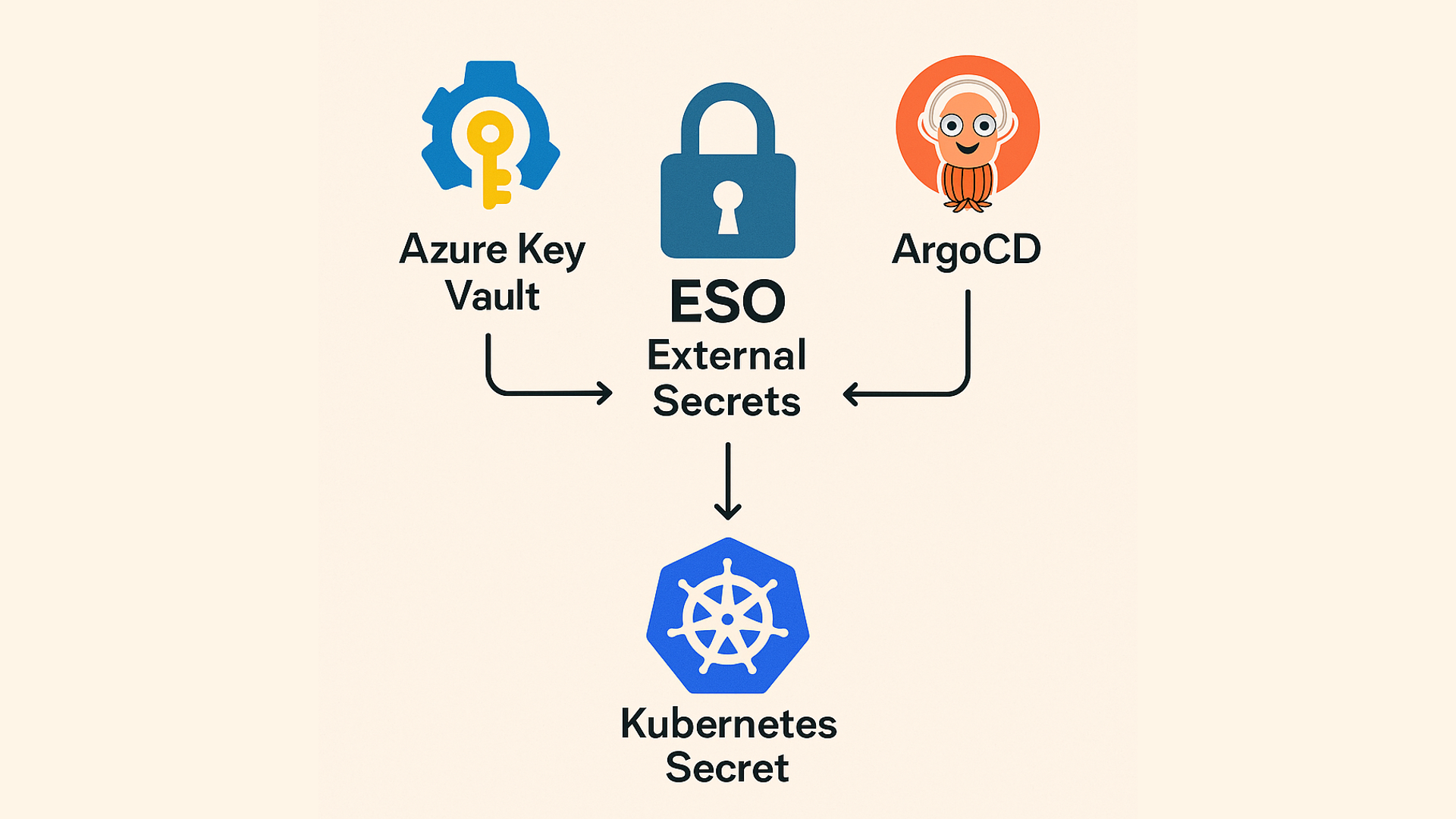
High-level architecture
Here’s what this setup does:
- Secrets are stored securely in Azure Key Vault
- Kubernetes has a one-time bootstrapped secret that lets ESO authenticate with Azure
- ESO is deployed via Helm and listens for
ExternalSecret CRDs - Secrets are declared in Git and synced via ArgoCD into the cluster
1
2
3
| Azure Key Vault ← ESO ← ExternalSecret ← ArgoCD
↓
Creates Kubernetes Secret
|
Getting started from scratch
Prerequisites
Project folder structure
1
2
3
4
5
6
7
8
| my-secrets-setup/
├── terraform/
│ ├── main.tf
│ ├── variables.tf
│ └── outputs.tf
├── manifests/
│ ├── clustersecretstore.yaml
│ └── externalsecret.yaml
|
- Start Rancher Desktop and make sure Kubernetes is enabled.
- Run:
1
2
3
4
| kubectl get nodes
NAME STATUS ROLES AGE VERSION
lima-rancher-desktop Ready control-plane,master 19h v1.32.3+k3s1
|
This should show your local cluster node.
Create a resource group, Azure Key Vault, and app credentials:
terraform/main.tf
terraform/variables.tf
terraform/outputs.tf
Run Terraform:
1
2
3
| cd terraform
terraform init
terraform apply -auto-approve
|
After that you should see:
1
2
3
4
5
6
7
8
| ...
Apply complete! Resources: 5 added, 0 changed, 0 destroyed.
Outputs:
client_id = "4a1d5c4f-903c-4166-b83f-6a262386c"
client_secret = <sensitive>
vault_uri = "https://mysecretskv.vault.azure.net/"
|
Step 3: Install External Secrets Operator with Helm
1
2
3
4
5
6
7
8
9
10
11
12
13
14
15
16
17
18
19
20
21
22
23
| > helm repo add external-secrets https://charts.external-secrets.io
> helm repo update
> helm install external-secrets external-secrets/external-secrets \
--namespace external-secrets \
--create-namespace \
--set installCRDs=true
NAME: external-secrets
LAST DEPLOYED: Thu Apr 24 11:09:03 2025
NAMESPACE: external-secrets
STATUS: deployed
REVISION: 1
TEST SUITE: None
NOTES:
external-secrets has been deployed successfully in namespace external-secrets!
In order to begin using ExternalSecrets, you will need to set up a SecretStore
or ClusterSecretStore resource (for example, by creating a 'vault' SecretStore).
More information on the different types of SecretStores and how to configure them
can be found in our Github: https://github.com/external-secrets/external-secrets
|
Step 4: Bootstrap Azure credentials into Kubernetes
Use the Terraform output values:
1
2
3
4
5
6
| ❯ kubectl create secret generic azure-secret-creds \
-n external-secrets \
--from-literal=client-id="$(terraform output -raw client_id)" \
--from-literal=client-secret="$(terraform output -raw client_secret)"
secret/azure-secret-creds created
|
Step 5: Define the ClusterSecretStore
manifests/clustersecretstore.yaml
1
2
3
4
5
6
7
8
9
10
11
12
13
14
15
16
17
18
| apiVersion: external-secrets.io/v1beta1
kind: ClusterSecretStore
metadata:
name: azure-kv-store-dev
spec:
provider:
azurekv:
tenantId: <your-tenant-id>
vaultUrl: https://mysecretskv.vault.azure.net/
authSecretRef:
clientId:
name: azure-secret-creds
key: client-id
namespace: external-secrets
clientSecret:
name: azure-secret-creds
key: client-secret
namespace: external-secrets
|
Replace <your-tenant-id> with your Azure tenant ID (available via az account show).
Apply it:
1
2
3
| ❯ kubectl apply -f manifests/clustersecretstore.yaml
clustersecretstore.external-secrets.io/azure-kv-store-dev created
|
Step 6: Define an ExternalSecret
manifests/externalsecret.yaml
1
2
3
4
5
6
7
8
9
10
11
12
13
14
15
16
17
| apiVersion: external-secrets.io/v1beta1
kind: ExternalSecret
metadata:
name: demo-secret
namespace: default
spec:
refreshInterval: 1h
secretStoreRef:
name: azure-kv-store-dev
kind: ClusterSecretStore
target:
name: demo-secret
creationPolicy: Owner
data:
- secretKey: DEMO_KEY
remoteRef:
key: demo-secret-key
|
Add the demo-secret-key to your Azure Key Vault manually or using:
1
2
3
4
5
6
7
8
9
10
11
12
13
14
15
16
17
18
19
20
21
22
| ❯ az keyvault secret set --vault-name mysecretskv --name demo-secret-key --value "hello-k8s"
{
"attributes": {
"created": "2025-04-24T09:20:15+00:00",
"enabled": true,
"expires": null,
"notBefore": null,
"recoverableDays": 90,
"recoveryLevel": "Recoverable+Purgeable",
"updated": "2025-04-24T09:20:15+00:00"
},
"contentType": null,
"id": "https://mysecretskv.vault.azure.net/secrets/demo-secret-key/b757ac4505554ced841b2ac864598ec6",
"kid": null,
"managed": null,
"name": "demo-secret-key",
"tags": {
"file-encoding": "utf-8"
},
"value": "hello-k8s"
}
|
Then apply:
1
2
3
4
5
6
7
8
| ❯ kubectl apply -f manifests/externalsecret.yaml
externalsecret.external-secrets.io/demo-secret created
❯ kubectl get externalsecrets.external-secrets.io
NAME STORETYPE STORE REFRESH INTERVAL STATUS READY
demo-secret ClusterSecretStore azure-kv-store-dev 1h SecretSynced True
|
Verify it synced:
1
2
3
| ❯ kubectl get secrets
NAME TYPE DATA AGE
demo-secret Opaque 1 16s
|
Bonus: A more “GitOps-y” way of doing it
Install External Secrets Operator with Helm
We’ll use a simple Terraform module to install ESO:
You only need to do this once per cluster.
Then use Terraform to provision an Azure Key Vault, an App Registration, and a client secret that ESO will use to authenticate as before.
Declare your ExternalSecrets (per app)
With ClusterSecretStore set up, we can declare secrets per application.
Here’s an example that syncs database credentials:
1
2
3
4
5
6
7
8
9
10
11
12
13
14
15
16
17
18
19
20
21
22
23
24
25
26
| apiVersion: external-secrets.io/v1beta1
kind: ExternalSecret
metadata:
name: myapp-db-credentials
namespace: myapp-dev
spec:
refreshInterval: 1h
secretStoreRef:
name: azure-kv-store-dev
kind: ClusterSecretStore
target:
name: myapp-db-credentials
creationPolicy: Owner
data:
- secretKey: POSTGRES_USER
remoteRef:
key: myapp-db-username
- secretKey: POSTGRES_PASSWORD
remoteRef:
key: myapp-db-password
- secretKey: POSTGRES_DB
remoteRef:
key: myapp-db-name
- secretKey: POSTGRES_HOST
remoteRef:
key: myapp-db-host
|
This syncs secrets from Azure into a Kubernetes Secret that your app can consume.
Use secrets in your application deployment
You can inject secrets into your app using envFrom in your Deployment:
1
2
3
| envFrom:
- secretRef:
name: myapp-db-credentials
|
Your application can then read environment variables like:
1
2
| $ echo $POSTGRES_USER
myapp
|
If your app needs a full connection string (e.g., DATABASE_URL), you can create that as a single secret in Key Vault and map it using remoteRef.
For production environments, I prefer generating credentials via Terraform to avoid manual work. Here’s how:
This creates secrets like:
myapp-db-username → "myapp"myapp-db-password → secure randommyapp-db-host → "myapp-db.internal"
All stored in Azure Key Vault.
Benefits of this approach
- No secrets end up in Git — everything is pulled from Azure at runtime
- New environments or apps just need Terraform + ArgoCD sync, nothing else
- One Key Vault serves many apps with no duplication
- Secrets are declared in Git and managed declaratively
- Secret generation, storage, and usage are separate concerns
Final thoughts
ESO is now my default for any production cluster. It connects secure secret storage (Azure Key Vault) with GitOps-driven Kubernetes workloads without leaking credentials into Git.
If you’re building multi-environment Kubernetes systems, it’s worth the setup cost.
The Security Lab Newsletter
This post is the article. The newsletter is the lab.
Subscribers get what doesn't fit in a post: the full attack code with annotated results, the measurement methodology behind the numbers, and the week's thread — where I work through a technique or incident across several days of testing rather than a single draft. The RAG poisoning work, the MCP CVE analysis, the red-teaming patterns — all of it started as a newsletter thread before it became a post. One email per week. No sponsored content. Unsubscribe any time.
Join the lab — it's free Already subscribed? Browse the back-issues →