Bootstrapping a Per‑Application Highly‑Available PostgreSQL Cluster with CloudNativePG, Terraform & GitOps:
A step‑by‑step tutorial using the Linkding bookmark manager as an illustration example.
TL;DR – In ~30 minutes you will spin‑up an application and its own highly‑available Postgres cluster using nothing but Git commits and Terraform. We will rely on CloudNativePG (CNPG) for the database layer, ArgoCD for GitOps continuous delivery, External‑Secrets to bridge secrets from Azure Key Vault, and a few battle‑tested DevSecOps patterns.
1 – Why per‑app HA Postgres?
A few reasons this setup makes sense:
- Blast radius — a rogue migration or
DELETE FROM only harms its own cluster. - Tuned resources — memory/CPU, WAL settings, and retention match the workload.
- Security boundaries — each namespace can enforce distinct RBAC & network policies.
- Lifecycle independence — upgrade, snapshot, or drop a database without downtime for others.
Yes, the trade‑off is more clusters to manage – However CNPG makes that almost trivial.
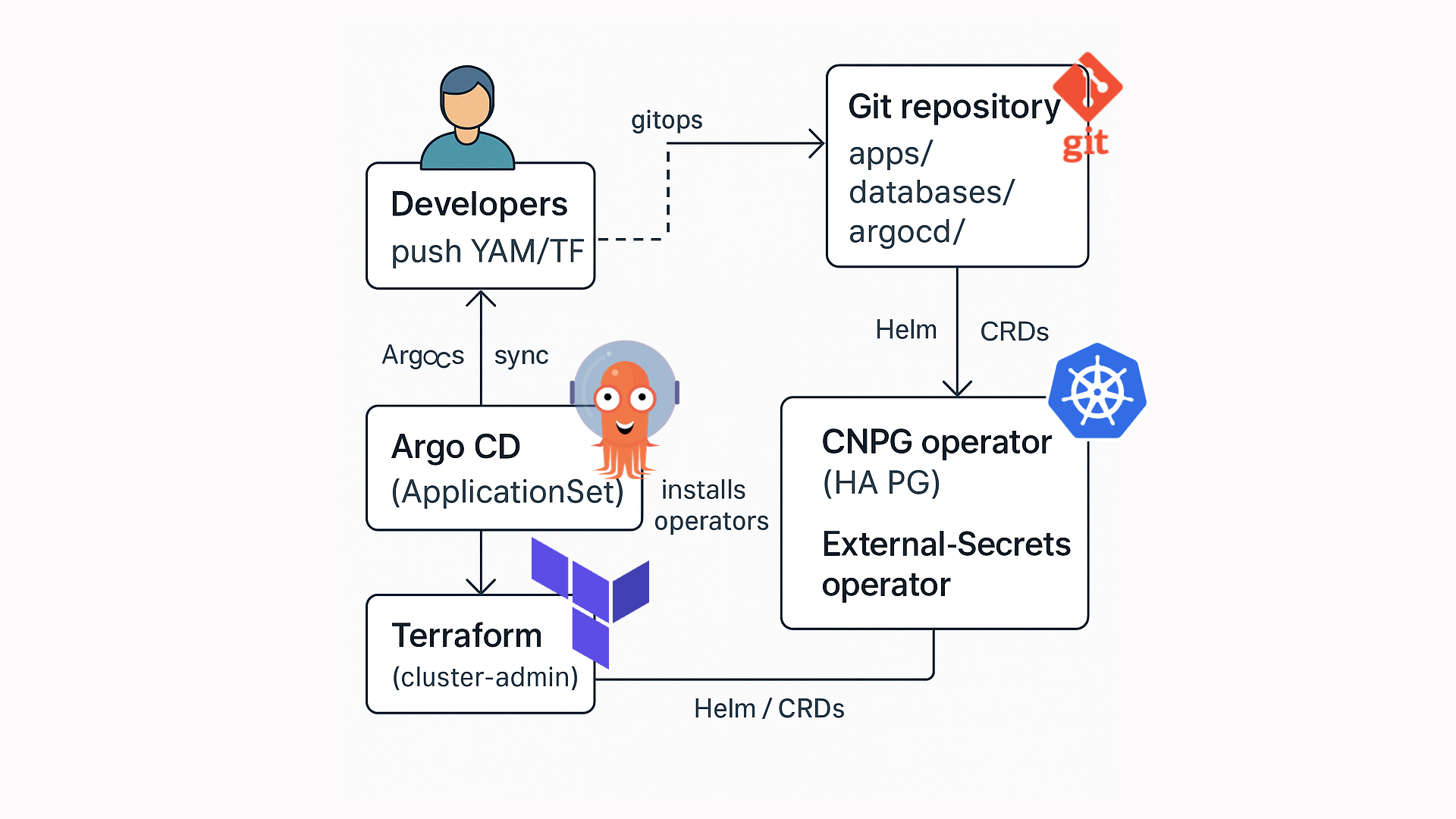
2 – Reference architecture
1
2
3
4
5
6
7
8
9
10
11
12
13
14
15
| ┌──────────────────────┐ ┌────────────────────────────┐
│ Developers │ git │ Git repository │
│ push YAML/TF ├─────────────▶│ apps/ databases/ │
└──────────────────────┘ │ argocd/ │
▲ gitops sync └──────────▲─────────────────┘
│ │
┌─────────┴────────┐ ┌───┴─────────────┐
│ Argo CD │ applies manifests . │ Kubernetes │
│ (ApplicationSet) ├──────────────────────── ▶│ cluster │
└─────────┬────────┘ └────┬────────────┘
│ Helm / CRDs │
┌─────────▼────────┐ ┌────▼──────────────────────────┐
│ Terraform │ installs operators │ CNPG operator (HA PG) │
│ (cluster‑admin) ├────────────────────────▶│ External‑Secrets operator │
└──────────────────┘ └───────────────────────────────┘
|
Operators, CRDs and namespaces are installed once via Terraform.
Everything application‑specific lives in Git and is reconciled by ArgoCD.
3 – Prerequisites
| Tool | Version tested | Purpose |
|---|
| Kubernetes | ≥ 1.27 | Where everything runs |
| Terraform | ≥ 1.5 | Cluster bootstrap & Day‑0 ops |
| ArgoCD | ≥ 2.8 | GitOps engine |
| CloudNativePG | ≥ 1.21 | PostgreSQL operator |
| External‑Secrets Operator | ≥ 0.9 | Sync secrets from Azure Key Vault |
| Azure Key Vault | any | Secret backend |
You also need kubectl, kustomize and a Git repo.
4 – Repository & GitOps layout
Our repo holds three top‑level domains:
1
2
3
4
5
6
7
8
9
10
11
12
13
14
15
16
17
18
19
20
21
22
23
24
25
26
27
28
29
| apps/ # application manifests
└─ linkding/
├─ base/
│ ├─ deployment.yaml
│ ├─ service.yaml
│ └─ kustomization.yaml
└─ overlays/
└─ dev/
├─ namespace.yaml
├─ secrets.yaml # ExternalSecret → Azure KV
└─ kustomization.yaml
# A symmetrical layout for the database
Databases/
└─ linkding/
├─ base/
│ ├─ database.yaml # CNPG Cluster
│ └─ kustomization.yaml
└─ overlays/
└─ dev/
├─ scheduled-backup.yaml
├─ secrets.yaml # S3 / Azure Blob creds
└─ kustomization.yaml
# Argo CD owns the sync‑loops
argocd/
├─ applicationset.yaml # applications/
├─ db‑applicationset.yaml # databases/
└─ external-secret-application.yaml
|
The base directory contains vendor‑agnostic manifests; overlays patch environment‑specific details (Kustomize).
Day‑0 steps are performed once per cluster:
Run terraform apply once to install the operators:
6 – Kustomize manifests
apps/linkding/base/deployment.yaml
1
2
3
4
5
6
7
8
9
10
11
12
13
14
15
16
17
18
19
20
21
22
23
24
25
26
27
28
29
30
31
32
33
34
35
36
37
38
39
40
41
42
43
44
| apiVersion: apps/v1
kind: Deployment
metadata:
name: linkding
spec:
replicas: 1
selector:
matchLabels:
app: linkding
template:
metadata:
labels:
app: linkding
spec:
containers:
- name: linkding
image: sissbruecker/linkding:latest
ports:
- containerPort: 9090
env:
- name: LD_DB_ENGINE
value: django.db.backends.postgresql
- name: LD_DB_HOST
value: pg-dev-rw.cnpg-dev.svc.cluster.local
- name: LD_DB_PORT
value: "5432"
- name: LD_DB_NAME
value: linkding
- name: LD_DB_USER
valueFrom:
secretKeyRef:
name: linkding-db-secret
key: username
- name: LD_DB_PASSWORD
valueFrom:
secretKeyRef:
name: linkding-db-secret
key: password
volumeMounts:
- name: linkding-data
mountPath: /etc/linkding/data
volumes:
- name: linkding-data
emptyDir: {}
|
databases/linkding/base/database.yaml
1
2
3
4
5
6
7
8
9
10
11
12
13
14
15
16
17
18
19
20
21
22
23
24
25
26
27
28
29
30
31
32
33
34
35
36
37
38
39
40
41
42
43
44
45
46
| apiVersion: postgresql.cnpg.io/v1
kind: Cluster
metadata:
name: linkding-db-dev-cnpg-v1
spec:
description: Postgres cluster for the linkding application
imageName: quay.io/enterprisedb/postgresql:16.1
instances: 3 # High‑availability
storage:
size: 5Gi
monitoring:
enablePodMonitor: true
inheritedMetadata:
labels:
app: linkding-database
policy-type: database
bootstrap:
initdb:
database: linkding
owner: linkding
secret:
name: linkding-db-creds
resources:
requests:
memory: 600Mi
backup:
barmanObjectStore:
destinationPath: https://myblob.blob.core.windows.net/linkding-db
azureCredentials:
storageAccount:
name: linkding-db-storage
key: container-name
storageSasToken:
name: linkding-db-storage
key: blob-sas
wal:
compression: gzip
data:
compression: gzip
retentionPolicy: 14d
|
With CNPG a read–write service (*-rw) and a read‑only service (*-ro) are generated for you – we point LD_DB_HOST to the former.
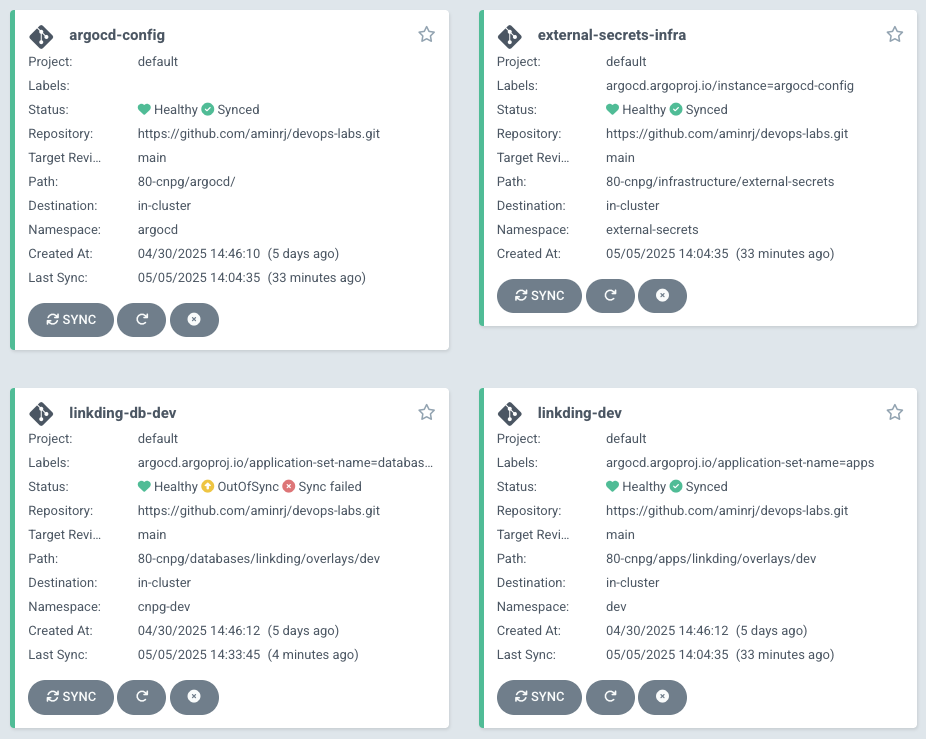
7 – ArgoCD ApplicationSets
A single ApplicationSet per domain keeps things DRY:
1
2
3
4
5
6
7
8
9
10
11
12
13
14
15
16
17
18
19
20
21
22
23
24
25
26
27
28
| # argocd/applicationset.yaml
apiVersion: argoproj.io/v1alpha1
kind: ApplicationSet
metadata:
name: apps
spec:
generators:
- git:
repoURL: https://github.com/aminrj/devops-labs.git
revision: main
directories:
- path: 80-cnpg/apps/*/overlays/*
template:
metadata:
name: "-" # example: commafeed-dev, listmonk-qa...
spec:
project: default
source:
repoURL: https://github.com/aminrj/devops-labs.git
targetRevision: main
path: "80-cnpg/apps//overlays/" #Example: apps/nextjs-app/dev
destination:
server: https://kubernetes.default.svc
namespace: "" # dev, qa, prod as namespace (simpler - for now)
syncPolicy:
automated:
prune: true
selfHeal: true
|
Repeat the same for databases/*.
8 – Bootstrapping the database
- Create secrets in Azure Key Vault (
linkding-db-username, password, blob SAS…). - Commit the
external-secrets.yaml manifest in both app and database overlays – EKS will automatically generate Kubernetes Secrets. - Merge to main ➜ ArgoCD applies everything ➜ CNPG operator spins‑up the cluster.
- CNPG initialises
linkding database & role using the provided secret.
Creating secrets in Azure Key Vault can be automated using Terraform:
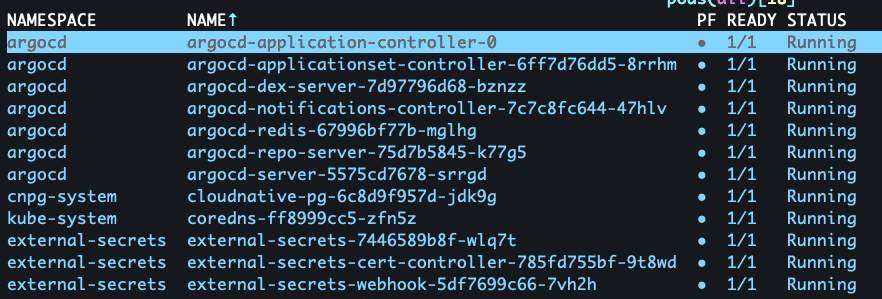
You can watch the progress:
1
2
| kubectl -n cnpg-dev get clusters
kubectl -n cnpg-dev get pods -l cnpg.io/cluster=linkding-db-dev-cnpg-v1
|
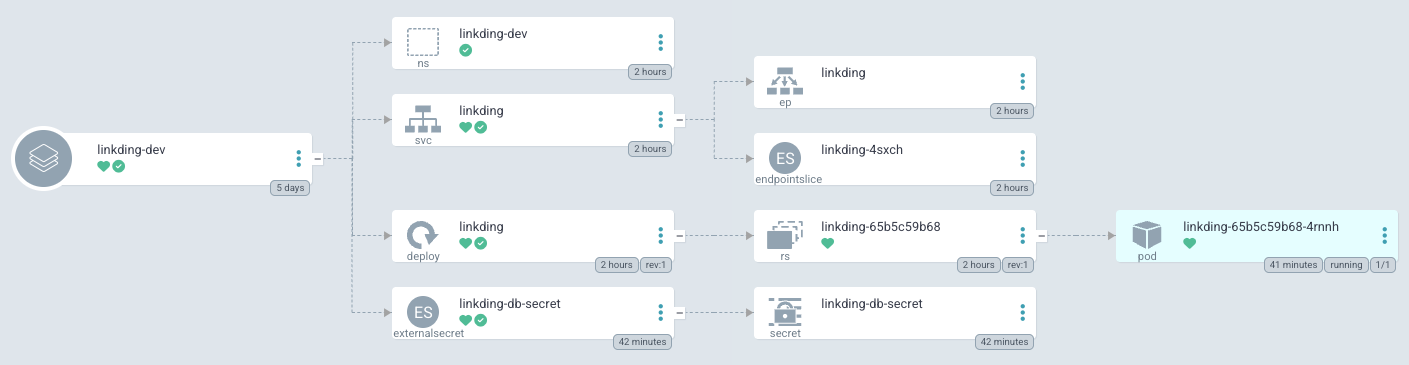
9 – Deploying Linkding
With the database ready, ArgoCD synchronises the apps/linkding Application:
1
| kubectl -n linkding-dev get svc,pods
|
Port‑forward and log‑in at http://localhost:9090.
10 – Back‑ups & disaster‑recovery
- Point‑in‑time recovery – WAL archives are pushed to Azure Blob on every segment.
- Scheduled full backups –
ScheduledBackup CRD kicks in daily at 03:00. - Retention –
14d keeps your bucket tidy.
Restore from any point:
1
2
3
4
5
6
7
| bootstrap:
recovery:
source: clusterBackup
database: linkding
owner: linkding
secret:
name: linkding-db-creds
|
11 – Monitoring & observability
CNPG exports a Prometheus PodMonitor out‑of‑the‑box. Wire it to your Prometheus stack and import the official Grafana dashboard (ID 18630). External‑Secrets also ships metrics at /metrics.
12 – Testing HA & fail‑over
Kill the primary:
1
| kubectl -n cnpg-dev delete pod linkding-db-dev-cnpg-v1-0
|
Within seconds a replica is promoted – check with:
1
| kubectl -n cnpg-dev get clusters linkding-db-dev-cnpg-v1 -o jsonpath='{.status.currentPrimary}'
|
Your application keeps running because its Service always targets the *-rw endpoint.
13 – Going further
- Instance = 5 – geo‑replicated clusters.
- StorageClass – use SSD vs HDD tiers per workload.
- OPA Gatekeeper – enforce labels & annotations across all clusters.
- Kyverno – auto‑inject
PodDisruptionBudget or certificate rotation. - Cross‑plane – provision cloud infra via CRDs entirely inside GitOps.
Conclusion
Linkding is running with its own HA Postgres cluster, provisioned and reconciled entirely from Git.
You can get access to the full code example here: Github repo.
With ~250 lines of YAML and minimal Terraform glue we achieved:
- IAM‑less secret management via External‑Secrets;
- dedicated, HA Postgres for every application;
- immutable, auditable deployments powered by Git;
- automated backups and disaster‑recovery.
Happy hacking – and remember: kubectl delete pod is the new pull‑the‑plug chaos test!
The Security Lab Newsletter
This post is the article. The newsletter is the lab.
Subscribers get what doesn't fit in a post: the full attack code with annotated results, the measurement methodology behind the numbers, and the week's thread — where I work through a technique or incident across several days of testing rather than a single draft. The RAG poisoning work, the MCP CVE analysis, the red-teaming patterns — all of it started as a newsletter thread before it became a post. One email per week. No sponsored content. Unsubscribe any time.
Join the lab — it's free Already subscribed? Browse the back-issues →