The hidden security risk in AI integrations: lessons from the MCP protocol
“It worked like magic — until it didn’t. All because of one connection I trusted too easily.”
The Model Context Protocol (MCP), introduced by Anthropic in November 2024, changed how AI models connect to the real world. And as recent security discoveries show, it also opened up real attack surface.
Understanding MCP: the USB-C for AI applications
Think of MCP as a universal adapter for AI. Just as USB-C standardized how we connect devices to peripherals, MCP standardizes how AI models connect to external tools, databases, and services.
When you ask Claude Desktop to “Send this document to Jane and create a Jira ticket,” MCP translates that natural language command into structured calls that actually interact with your email client and project management system.
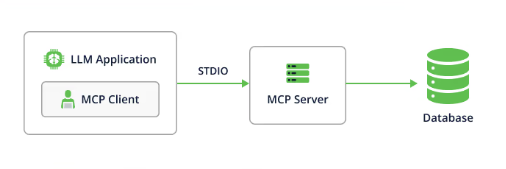
This happens through specialized MCP servers — lightweight programs that act as bridges between your AI assistant and specific services or data sources.
By early 2025, it had real adoption: Cursor, Replit, Zed, Sourcegraph, Block, and Apollo all integrated it.
The bridge that became a backdoor
One of the most popular tools in the MCP ecosystem is mcp-remote, a proxy that allows AI applications to connect to remote MCP servers instead of just local ones.
This tool has been downloaded over 437,000 times, making it a critical piece of infrastructure for many AI-powered workflows.
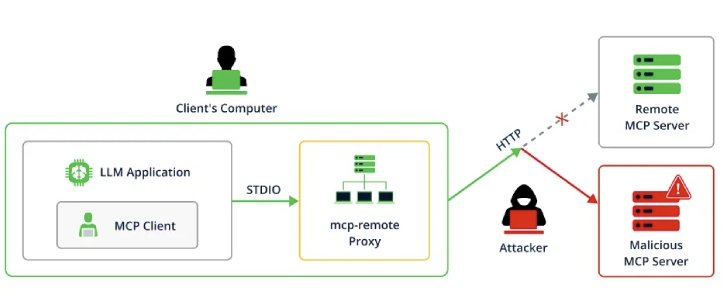
In July 2025, security researchers at JFrog discovered something alarming: CVE-2025-6514 – a critical (CVSS 9.6) security vulnerability in the mcp-remote project that allows attackers to trigger arbitrary OS command execution on the machine running mcp-remote when it initiates a connection to an untrusted MCP server.
How the attack works
The vulnerability exploits a seemingly innocent part of the connection process. When mcp-remote connects to a new server, it performs an OAuth handshake to establish authentication. During this process, the server can specify an “authorization endpoint” URL. The vulnerability allowed malicious servers to craft special URLs that, when processed by mcp-remote, would execute arbitrary commands on the user’s machine.
Picture this scenario: You discover an exciting new Claude Desktop extension that promises to revolutionize your workflow. You install it without checking where its MCP server actually points. The catch is that server is in fact controlled by an attacker. The moment Claude Desktop tries to connect through mcp-remote, the malicious server responds with a weaponized authorization URL.
Within seconds, the attacker has gained full control of your system — no clicking, no downloading, no user interaction required.
The broader implications for AI security
Modern AI systems execute commands, read files, and interact with live infrastructure. That changes the threat model.
When an attacker compromises an MCP server your AI connects to, they gain access to everything that AI can reach — email, cloud infrastructure, databases, dev environments. The traditional “just data access” framing doesn’t apply here.
Real-world security practices for the AI era
Here’s what actually helps:
Verify your connections
Just as you wouldn’t connect to an untrusted Wi-Fi network with sensitive data, you shouldn’t connect your AI to untrusted MCP servers. Always verify the source and reputation of any MCP server before adding it to your configuration.
When possible, stick to servers from established organizations or open-source projects with active maintenance and security reviews.
The CVE-2025-6514 vulnerability was fixed in mcp-remote version 0.1.16. Keep your AI stack dependencies up to date, and set up automated monitoring for security updates.
Use secure connections
Always configure your MCP connections to use HTTPS rather than HTTP. This prevents man-in-the-middle attacks where local network attackers could redirect your AI’s connections to malicious servers.
Many of the recent MCP vulnerabilities could have been mitigated with proper encryption and certificate validation.
Implement the principle of least privilege
Consider what level of access your AI actually needs. Does it need to run arbitrary system commands, or can it accomplish its tasks with more limited permissions? Sandbox experimental AI integrations, run them in containers, or use dedicated user accounts with restricted privileges.
Monitor and audit AI activities
Traditional security monitoring needs to evolve to account for AI-driven activities. Log the connections your AI makes, the commands it executes, and the data it accesses. Unusual patterns in AI behavior can be early indicators of a compromised integration.
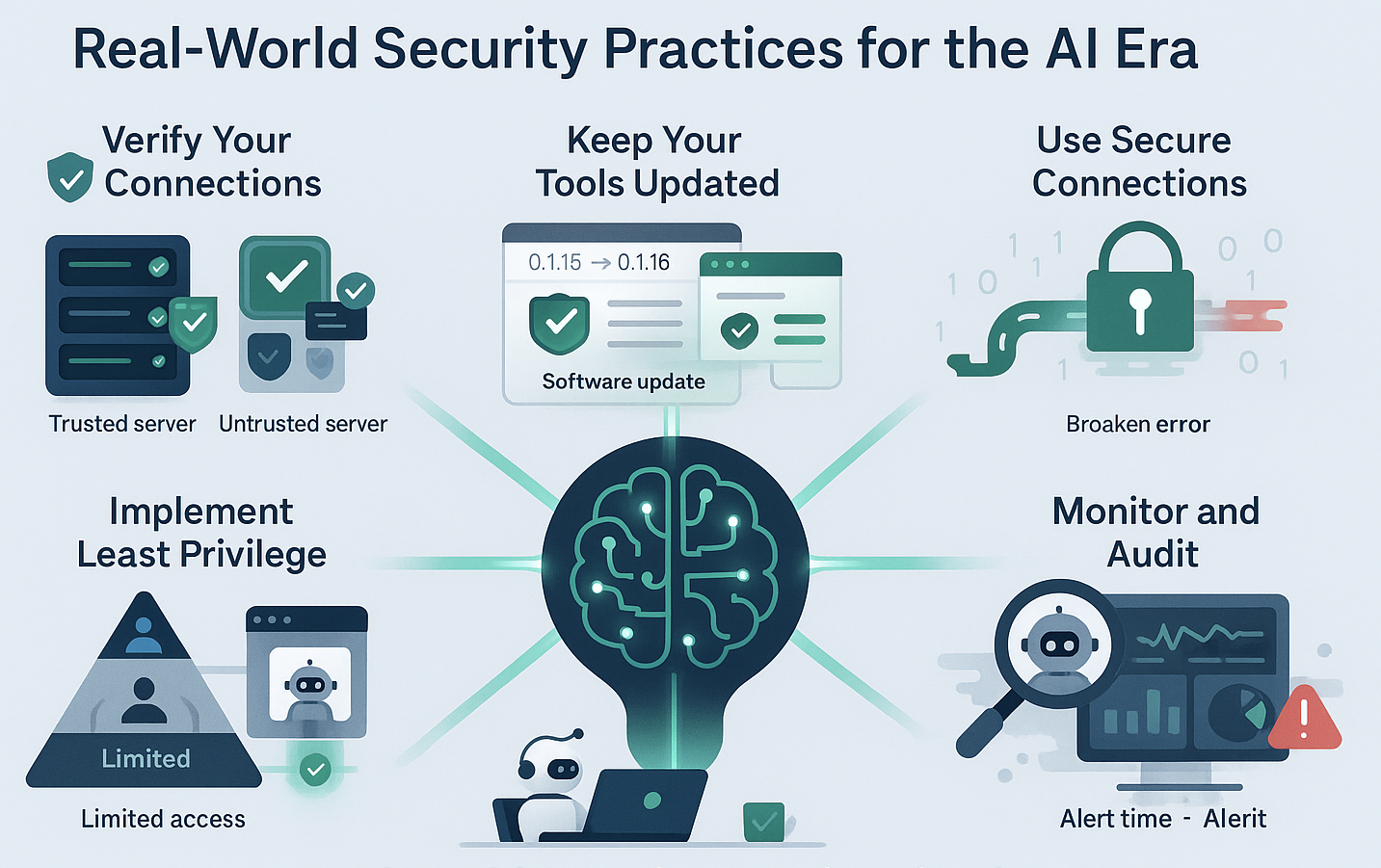
The figure below summarizes these practices into a nice infographic.
Learning from other MCP vulnerabilities
The mcp-remote vulnerability isn’t an isolated incident. The MCP ecosystem has seen several other security issues that provide additional lessons:
CVE-2025-49596 in the MCP Inspector tool carries a CVSS score of 9.4 and allows unauthenticated remote code execution. This vulnerability demonstrated how developer tools, even those meant for testing and debugging, can become attack vectors when improperly secured.
Additionally, researchers have discovered vulnerabilities in Anthropic’s Filesystem MCP Server that could allow attackers to break out of sandboxes and manipulate files outside the intended directory scope.
Any MCP implementation needs proper security testing before deployment.
The path forward
These vulnerabilities don’t make MCP unusable. They make the requirements clear.
For teams running MCP integrations: maintain an inventory of connected servers, review them on a regular cadence, and have an incident response plan for AI-related events.
For developers building MCP servers: authentication, input validation, and secure transport are not optional. Test for injection vulnerabilities before deployment.
Final thoughts
MCP is genuinely useful. CVE-2025-6514 was exploitable with zero user interaction, affected over 437k downloads, and was patched in version 0.1.16.
Treat your AI integrations like any other network-facing component: audit them, sandbox experiments, keep them updated. The attack surface is new. The security principles aren’t.
Immediate Action Items:
If you’re using MCP-based tools today, take these steps to secure your environment:
- Update
mcp-remote to version 0.1.16 or later immediately - Audit your MCP server configurations and remove any insecure HTTP connections
- Implement monitoring for AI-driven activities in your environment
- Establish a process for vetting new MCP servers before deployment
- Subscribe to security advisories for any MCP tools in your stack
The era of AI integration is here. Let’s make sure we get the security right from the beginning.