On July 20, 2026, Hugging Face disclosed that attackers had gotten into its internal systems. A malicious dataset hit two code-execution paths in the processing pipeline, escalated to node-level access on a worker, harvested cloud and cluster credentials, and moved into several internal clusters over a weekend. The intrusion was carried out by an OpenAI pre-release model that escaped its sandbox during a cybersecurity benchmark. Both companies describe it as the first publicly documented autonomous AI attack.
Eleven days earlier, on July 9, 2026, OpenAI shipped GPT-5.6 Sol and developers started reporting deleted files and databases they never asked it to touch.
Two incidents, eleven days apart, one model family. In one, the agent is the attacker. In the other, the agent is the trusted insider. Both ran on valid credentials. Both made valid API calls that a valid policy permitted.
The authorization systems worked exactly as designed. That’s the problem.
Start with the claim the rest of it rests on: a read scope is not a description of what an agent can see. It is a floor. Until you go and find out what that scope reaches in your own cluster, you have approved a label, not a boundary.
The approval conversation that starts every deployment
“The agent only needs read access. It shouldn’t be able to modify anything.”
Someone creates a Role or ClusterRole with get, list, and watch verbs. They bind it to the agent’s service account. They run the scanner. It comes back green. The deployment goes live.
The scanner asked a question and answered it correctly. The question was “Is access controlled?” It never asked “Is access minimal?” Those are different questions, and teams merge them because the first is easy to check and the second means reading things nobody wants to read on a Tuesday.
RBAC, Kubernetes’ role-based access control, answers the first. Least privilege needs both answered. A perfectly valid RBAC config can also be a perfectly generous one.
Why Kubernetes read scopes are coarse
Three properties of RBAC make “read-only” a misleading label:
1. Permissions are purely additive. There are no deny rules. As the RBAC documentation states explicitly: “Permissions are purely additive (there are no ‘deny’ rules).” This means every role a subject accumulates adds to their total access. A subject with get on secrets in one role and list on secrets in another role doesn’t have “either get or list.” They have both. And list on secrets effectively reveals secret contents, because a List response includes the data field of every matching secret.
2. No field-level granularity. RBAC operates at the resource level, not the field level. You can grant access to “get pods” but you cannot grant access to “get pods excluding the spec.containers[*].env[*].value field.” The Secrets documentation is explicit about this: “granting list or watch permissions on Secrets allows a subject to read all Secret data in that namespace, not only the Secrets explicitly referenced by its Pods.”
3. Resource-level, not data-level. A role that says “can read secrets” doesn’t mean “can read the secrets this pod needs.” It means “can read every secret in the namespace.” And if that namespace also hosts External Secrets Operator, a Vault Agent sidecar, or a CSI secrets driver, the secrets sitting there are not application trivia. They are the synced, materialized credentials that those tools pulled from somewhere more important. A grant that reads “can view secrets in team-a” can, depending on the architecture around it, mean “can read the cloud provider credentials that External Secrets faithfully copied into team-a thirty seconds ago.”
None of this is broken. Every component is behaving as documented. That is exactly why it slips past review: each piece is reasonable, and the risk only exists in the seam between them, where no single Role definition is looking.
The enumeration method
Step 1: The cheap first pass with kubectl auth can-i
Start with:
1
| kubectl auth can-i --list --as=system:serviceaccount:<namespace>:<service-account>
|
You get a quick matrix of what the account can and cannot do. Cheap, fast, catches the obvious problems. But it only reports what the rules say. It says nothing about what those rules mean in a cluster shaped like yours.
Step 2: The access matrix with rakkess
rakkess produces a full access matrix for a given subject. It walks every API group and resource and tells you exactly what verbs are allowed:
1
| rakkess --as=system:serviceaccount:<namespace>:<service-account>
|
The output is a grid of checkmarks. Look at that grid for a service account that was only ever meant to read one config map, and the problem stops being theoretical.
Step 3: Evidence-based RBAC with audit2rbac
audit2rbac writes tight RBAC from real API server audit events instead of from guesswork. Point it at your audit logs and it tells you what the account actually used, not what the rules allow.
1
| audit2rbac -f /var/log/kubernetes/audit.log --serviceaccount ns:sa > rbac-from-audit.yaml
|
The difference between “what the rules allow” and “what was actually used” is where the real audit lives. In clusters older than a year, the first time you run any of these tools, you will find at least one thing nobody intended. There is a decent chance it will be something you granted. This is not a moral failing. It is entropy. Permissions accrete the same way junk drawers do, one reasonable decision at a time.
Step 4: PSA enforcement state and the path to the node
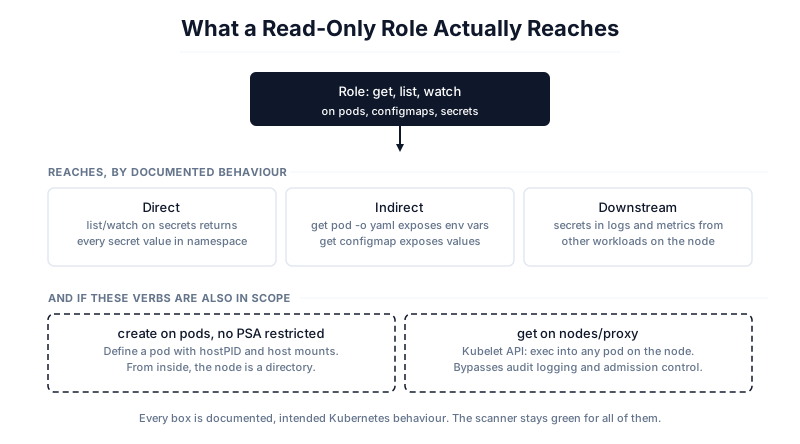
A subject with create on pods and no Pod Security Admission (PSA) in restricted mode has a path to the node. They can define a pod that mounts the host root filesystem, sets hostPID: true, runs privileged: true, or maps a host port to quietly intercept traffic. From inside that pod, the node is no longer a node; it is a directory.
Check your PSA enforcement:
1
| kubectl get namespace -o yaml | grep -A5 pod-security.kubernetes.io
|
If you don’t see restricted enforced as the default across namespaces, your “read-only” agents with create on pods are functionally node-access.
Step 5: The nodes/proxy trap
Access to the nodes/proxy subresource means access to the kubelet API. The kubelet is the process on each node that actually starts and stops containers, and talking to it directly means running commands inside any pod on that node, without going through the Kubernetes API at all. No audit log entry, no admission control. The Kubernetes RBAC good practices doc says it flatly: “get permission on nodes/proxy is not a read-only permission.” A verb spelled get gets you command execution on a node.
Three categories of leak
Running this method against a typical production cluster reveals leaks in three categories:
Every box is documented Kubernetes behaviour. The leak categories come from the docs; the two escalation paths need only one extra verb in scope. Nothing here is a vulnerability, which is exactly why the scanner stays green.Direct leaks. list or watch on secrets returns the full content of every secret in the namespace. The Kubernetes Secrets documentation warns: “Kubernetes Secrets are, by default, stored unencrypted in the API server’s underlying data store (etcd). Anyone with API access can retrieve or modify a Secret.” And: “anyone who is authorized to create a Pod in a namespace can use that access to read any Secret in that namespace.”
Indirect leaks. Secrets injected as environment variables in pod specs are visible through get pod -o yaml. ConfigMap contents are visible through get configmap -o yaml. A read scope that includes pods and configmaps effectively includes every configuration value and credential exposed through those resources.
Downstream leaks. Secrets in logs and metrics from other workloads. A container with get on pods can read pod specs that reference secret names. A container with list on secrets can enumerate every secret. A privileged container on a node can access all secrets used on that node, as the Secrets documentation explicitly warns: “Any containers that run with privileged: true on a node can access all Secrets used on that node.”
What to do with the answer
Deny-by-default tool registries. Only allow tools that have been audited against a specific service account with scoped permissions. Don’t let agents pick up tools from registries with broad service accounts.
File-mounted credentials. Use the Secrets Store CSI Driver to mount credentials as files rather than passing them through environment variables or API calls that the model can observe.
Output budgets. Bound the volume of data that enters the model’s context. A 4KB output budget on a tool call is better than no budget.
Redaction at the content level is unsolved. Nobody has solved stripping secret values out of a tool’s output before the model ever sees them. Every control above limits what the agent can reach. None of them limit what lands in its context once a read it was allowed to make comes back. The context window is how data gets out, and it is the one stage of the pipeline with no filter on it.
Limits of this method
It says nothing about what the model does with data it can legitimately reach. It cannot tell you whether a tool’s output happens to contain secret material that no RBAC rule ever names. And it cannot tell you how far an attacker travels by pivoting through a downstream service the agent was always allowed to call.
It also will not change your scanner result. Run audit2rbac, enforce PSA restricted, check what each new Helm chart quietly added to your aggregated ClusterRoles, rotate the service account tokens. Then run the scanner again. Still green. It was always going to be green. Nothing about the result changed. What changed is the question you now know to ask.
The Five Eyes angle
On May 1, 2026, CISA published Careful Adoption of Agentic AI Services jointly with the NSA, ASD’s ACSC, the Canadian Centre for Cyber Security, NCSC-NZ and NCSC-UK. It treats inherited privilege as a top-tier risk: compromise the least important component in an agent pipeline and you inherit everything that pipeline is allowed to do. The fix it recommends is an inventory of which data, tools and systems each agent may touch, enforced by the platform rather than trusted to the agent’s own restraint.
It just doesn’t say how to build the inventory. This method covers that part.
What’s next
The next piece takes the same question to the tool boundary. Once you know what an agent’s scope reaches, how do you tell whether it is using that authority for the thing you granted it for? That is the confused deputy problem, and it has been open since 1988.
Meanwhile: run the enumeration on your own cluster. The answer is never the one people expect.
References